

Introduction
Security remains one of the highest priorities for any organization using enterprise cloud platforms. Within the Salesforce ecosystem, this has led to the continuous evolution of authentication mechanisms, with an increasing focus on phishing-resistant methods based on standards such as FIDO2 and WebAuthn.
While multi-factor authentication (MFA) is already widely adopted across Salesforce organizations, Salesforce's latest guidance signals a stronger emphasis on enhanced security requirements and the broader adoption of more robust authentication methods, including built-in device authenticators, security keys, and, in the future, passkeys.
For organizations, the challenge is not purely technological—it is operational as well.
The Evolution of MFA in Salesforce
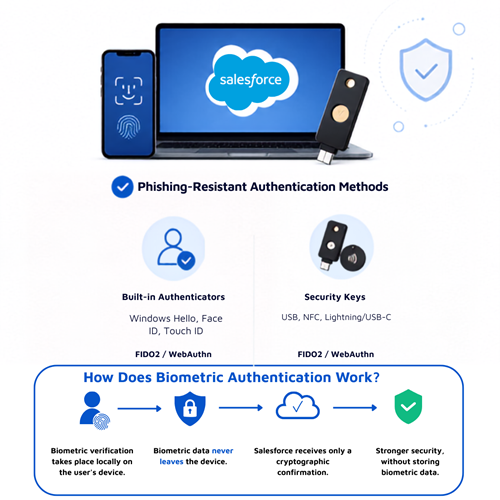
Salesforce currently supports several identity verification methods, including authenticator apps, physical security keys, and built-in device authenticators such as Windows Hello, Touch ID, and Face ID.
According to Salesforce's official documentation, organizations should prioritize phishing-resistant authentication methods, particularly built-in device authenticators and FIDO2/WebAuthn-compatible security keys. These methods significantly reduce the risk of credential theft and social engineering attacks.
In addition, Salesforce has announced updates to its MFA requirements for 2026, further reinforcing the adoption of phishing-resistant authentication methods for specific user profiles and access scenarios.
Why Is This Important for Organizations?
Many organizations still associate MFA with entering an additional verification code during login. However, the current evolution of authentication goes far beyond that.
Modern authentication models aim to eliminate reliance on passwords and one-time passcodes by replacing them with cryptographic credentials securely tied to the user's device.
In practice, this delivers several key benefits:
- Reduced exposure to phishing attacks.
- Stronger security for privileged users.
- A smoother and more seamless user experience.
- Less reliance on reused or compromised passwords.
At the same time, these advances introduce new management considerations that IT teams and Salesforce administrators need to address.
From a platform administration perspective, the evolution of authentication requires proactive planning.
Some of the key areas that organizations should evaluate include:
Device Compatibility
Not all employee devices support Windows Hello, Face ID, Touch ID, or other WebAuthn-compatible authentication mechanisms.
Alternative Authentication Methods
Not all users will be able to use biometric authentication or built-in device authenticators. It is therefore important to ensure that appropriate alternative authentication methods are available and properly configured.
Privileged Users
Salesforce administrators and users with elevated permissions will increasingly be subject to stronger authentication requirements, reflecting their critical role and higher risk profile.
Sandbox and Testing Environments
Authentication-related changes should always be validated in sandbox environments before being deployed to production. This helps identify potential compatibility issues, minimize disruption to users, and ensure a smooth rollout.
The Role of Biometrics
A common misconception is that Salesforce stores users' biometric data.
In reality, authentication methods based on FIDO2 and WebAuthn work very differently.
When a user authenticates with Face ID, Touch ID, or Windows Hello, the biometric verification takes place locally on the device. Salesforce never receives the user's fingerprint or facial image. Instead, it receives only a cryptographic confirmation that the user's identity has been successfully verified.
This architecture significantly strengthens security while avoiding the risks associated with the centralized storage of biometric data.
Our Recommendations for Organizations
Regardless of how quickly these new capabilities are adopted, we recommend that Salesforce organizations take the following steps:
- Review their current MFA strategy.
- Inventory the devices used by employees.
- Identify users with elevated privileges.
- Ensure appropriate alternative authentication methods are available.
- Test new authentication configurations in sandbox environments.
- Update access management and device security policies.
- Prepare internal communications to support future authentication changes.
Organizations that take a proactive approach will be better positioned to minimize the operational impact of future platform updates while providing a more secure and seamless authentication experience.
Conclusion
The evolution of authentication in Salesforce reflects a broader industry trend: moving away from password-based security towards stronger, cryptography-based authentication built on trusted devices.
For organizations, these changes should be seen not merely as a technical requirement, but as an opportunity to strengthen security, reduce operational risk, and future-proof their Salesforce environment.
At WorldIT, we closely monitor these developments and help organizations assess the impact of new Salesforce capabilities, define authentication strategies tailored to their needs, and ensure implementations are aligned with their security and compliance requirements.
References