

- Introduction
- What is a Customer Portal?
- Benefits for the business
- How does a Portal work?
- When to implement?
- What should a Portal include?
- Where does AI fit in?
- Portal + CRM + AI + Agents: A New CX
- How to Measure Success?
- Is Your Company Ready?
- A Customer Portal Doesn’t Start with the Portal
- From Emails to CX
- Does Your Company Need a Customer Portal?
Introduction
The customer experience does not begin when someone responds to an email.
It starts much earlier: with how easily customers can find information, track a request, submit documentation, or understand the current status of a process.
For this reason, the question for many companies is no longer:
“How can we respond faster?”
Instead, it has become:
“How can we give customers access to the information and services they need, without always relying on a person?”
This is where Customer Portals come in.
And with the evolution of Artificial Intelligence and autonomous agents, the question goes even further:
“How can we create an experience that is not only digital, but also intelligent and proactive?”
A Customer Portal is a secure digital environment where each customer can access information and interact with the company in a personalised way.
Depending on the business, it can enable customers to:
- Check order status.
- Track processes or projects.
- Access documents and invoices.
- Submit documentation.
- Open and track support requests.
- Update certain details.
- View their interaction history.
- Receive notifications and updates.
More than a restricted area of a website, a Customer Portal can act as a true connection point between customers and the organisation’s internal processes.
Website, Restricted Area or Customer Portal?
What are the benefits for the business?
A Customer Portal is not just a technology initiative.
It is, above all, an initiative focused on improving the customer experience and operational efficiency.
Some of the most common benefits include:
Fewer repetitive tasks
Teams spend less time handling recurring, low-value requests.
Better customer experience
Customers can get answers when they need them, without depending on human availability or business hours.
Greater transparency
Visibility into processes, requests and statuses reduces uncertainty and builds trust.
Greater scalability
The organisation can serve more customers without proportionally increasing the administrative workload.
More consistent communication
Information is presented directly from the systems that support the business.
Greater focus on value-added activities
Teams spend less time on administrative tasks and more time on situations that genuinely require expertise, decision-making and relationship management.
How does a Customer Portal work?
In most companies, a portal does not replace existing systems.
Instead, it acts as a digital interaction layer on top of the data and processes already in place.
Simplified architecture
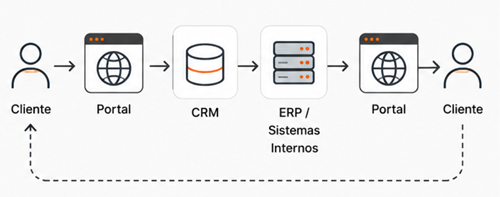
In practice:
- The customer authenticates.
- The portal identifies the user and their respective permissions.
- The CRM provides the context of the relationship with that customer.
- The ERP and other systems provide operational information.
- The portal presents the data in a simple and contextualised way.
- The customer’s interactions are sent back to the systems for processing.
When properly implemented, the portal becomes a central point of the customer’s digital experience.
When does it make sense to implement a Customer Portal?
Not every company needs a Customer Portal.
However, there are signs that often indicate a clear opportunity:
- The same questions come up repeatedly
Order status, ongoing processes or pending documentation.
- The information already exists, but still depends on internal teams
The data is available in the systems, but customers cannot access it directly.
- There is a high volume of document exchange by email
Attachments, versions and resending documents can become difficult to manage.
- Customers need to track processes
The greater the visibility, the less need there is for follow-up enquiries.
- Teams are overloaded with administrative tasks
There are predictable activities that could be handled directly by the customer.
- There is potential for automation and Artificial Intelligence
When requests follow predictable patterns, there is often an opportunity to increase autonomy through technology.
Examples of Use Cases by Industry
Distribution and Manufacturing
- Order tracking
- Delivery status
- Invoices and commercial documents
- Complaint management
Professional Services
- Project tracking
- Deliverable approval
- Document sharing
- Request management
Insurance
- Policy access
- Claims management
- Document submission
Healthcare
- Administrative processes
- Document submission
- Request and appointment management
Real Estate
- Process tracking
- Document management
- Communication between customers and teams
Where does Artificial Intelligence fit in?
From Chatbots to Intelligent Agents
This is where an important evolution takes place.
A traditional chatbot answers questions.
An agent can go further and act on processes.
Depending on the architecture and rules defined by the organisation, an agent can:
- Understand objectives.
- Query multiple systems.
- Validate information.
- Initiate processes.
- Execute authorised actions.
- Update records.
- Request approvals.
- Escalate complex situations.
Imagine a customer writes:
“I have a delayed order. I need to know why and whether I should change the installation date.”
An agent can:
- Identify the order.
- Query the CRM and logistics systems.
- Determine the cause of the delay.
- Assess the impact on the process.
- Suggest a new date.
- Automatically initiate the rescheduling, if authorised.
The difference is no longer simply about answering.
It is about being able to take action.
Portal + CRM + AI + Agents: A New Customer Experience
The true potential emerges when different components work together.
Portal → digital interface
CRM → relationship context
ERP and internal systems → data and processes
AI → intent understanding
Agents → execution and orchestration
The architecture can be represented simply as:

The objective is not simply to make information available.
It is to create an integrated experience where customers, employees, systems and processes work together.
Autonomy Without Losing Control
Not every action should be performed automatically.
Organisations can define different levels of autonomy.
Inform
The agent retrieves information and responds to the customer.
Recommend
It analyses the context and suggests an action.
Prepare
It gathers the relevant information for human validation.
Execute
It performs previously authorised actions.
Escalate
It forwards complex situations to a human.
This combination of AI, automation and human oversight makes it possible to increase efficiency without compromising control.
The Biggest Challenge May Not Be Technological
Implementing a Customer Portal is only one part of the process.
Ensuring its adoption is often the greater challenge.
For a portal to be used, it should:
- Solve real customer problems.
- Be simple and intuitive.
- Provide useful information.
- Offer an experience superior to traditional channels.
- Be integrated into the organisation’s processes.
A portal that does not create value for the user is unlikely to be adopted, regardless of the technology behind it.
How to Measure the Success of a Customer Portal?
A portal should be measured by the results it delivers, not just by the features it provides.
Some commonly used metrics include:
- reduction in the volume of emails and calls;
- average customer response time;
- portal adoption rate;
- percentage of requests resolved through self-service;
- reduction in the administrative workload for teams;
- customer satisfaction;
- average request processing time;
- adoption levels of digital features.
Measuring these indicators helps organisations understand the real impact of the initiative on customer experience and operational efficiency.
Before moving forward with technology, it is worth asking a few key questions:
- How many contacts do we receive each month requesting information that already exists in our systems?
- How many hours are spent on repetitive tasks?
- Which processes generate the most follow-up requests?
- What information would we like to make available in real time?
- Are our systems ready to share this information?
- Which processes could be automated?
- Where would it make sense to apply AI?
- Which actions require human validation?
The answers can help determine whether there is a problem that a Customer Portal can effectively solve.
A Customer Portal Doesn’t Start with the Portal
The most common mistake is to start with the technology.
The starting point should always be the customer journey.
- What information are they looking for?
- What actions do they need to perform?
- Where is the data?
- Which systems are involved in the process?
- Where are the bottlenecks?
- Which steps can be automated?
- Where can AI add value?
- Which actions can be delegated to agents?
- Which situations should continue to require human intervention?
Only then does it make sense to design the technology solution.
Because a modern portal that is disconnected from the company's processes and systems can easily become just another channel to manage.
From Reducing Emails to Transforming the Customer Experience
Reducing emails can be a result.
But it should not be the goal.
The true value of a Customer Portal does not lie in the portal itself.
It lies in its ability to connect customers, employees, processes, data, and systems in an integrated experience.
When combined with CRM, automation, Artificial Intelligence, and intelligent agents, the portal becomes more than just a self-service channel.
It becomes an intelligent point of interaction with the business.
Organisations that can create this connection will be better prepared to meet today's customer expectations and the service models of the future.
Fewer emails may be the result. A simpler, more autonomous, integrated, and intelligent experience should be the goal.
Are You Considering Whether a Customer Portal Makes Sense for Your Company?
At WorldIT, we help organisations integrate CRM, Customer Experience, Portals, Automation, Systems Integration, and Artificial Intelligence, creating digital experiences that connect customers, people, data, and processes.
As AI and intelligent agents continue to evolve, this connection can go far beyond simply providing access to information. It can enable organisations to automate interactions, accelerate processes, and increase customer autonomy without compromising security or control.
The goal is not to implement another technology. It is to create an experience where people, systems, processes, and intelligence work together to generate real value for both the business and its customers.